
Sheep to Sleep
Count sheep aloud and wind down at bedtime: a breathing guide, sleep timer, and your past seven nights of sleep. No ads, no account.
Overview
Sheep to Sleep turns the classic bedtime ritual of counting sheep into a quiet companion for winding down. A calm voice counts sheep aloud for you, so you can lie back with your eyes closed and just listen — no need to watch the screen. The voice keeps going when you lock the screen, and ends quietly on its own, after 100 sheep or your sleep timer.
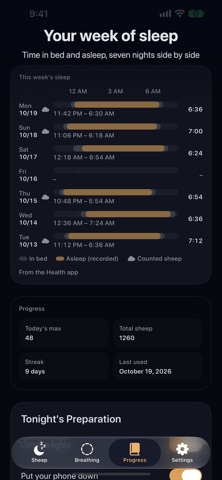
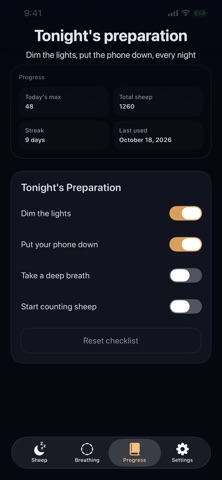
Beyond counting, the app offers a gentle breathing guide to settle down before bed, a Tonight's Preparation checklist, and a Progress tab that shows your past seven nights of sleep side by side (time in bed and time asleep, read from Apple Health, with a small mark on nights you counted sheep). Sheep, Breathing, Progress, and Settings each have their own tab.
Apple Health is optional and off by default: finished breathing sessions can be saved as Mindful Minutes, and your recorded sleep times can be shown on a morning card and in This week's sleep (read only). Health data stays on your device. There is no account and there are no ads. Sheep to Sleep is a relaxation aid, not a medical tool.
Who It Is For
- People who have trouble falling asleep and want a screen-free way to wind down
- Parents settling children at bedtime or nap time
- Anyone who wants a simple pre-bed routine without an account or ads
- Users who find guided breathing helpful for relaxing before sleep
- People who like to look back at their past week of sleep from Apple Health
Main Features
- Sheep counted aloud for you — just listen, no need to watch the screen
- Voice keeps going when the screen is locked and ends quietly after 100 sheep or your timer
- Sleep timer in the Sheep tab that stops the counting automatically
- Gentle breathing guide with Inhale / Hold / Exhale phases to settle down before bed
- This week's sleep in Progress: your past seven nights side by side, read only from Apple Health
- Tonight's Preparation checklist in the Progress tab
- Start hands-free with Siri, Control Center, or the Action button through Shortcuts
- Optional Apple Health: save finished breathing sessions as Mindful Minutes; off by default
How to Use
- Open the Sheep tab, choose a sleep timer if you like, and tap Start
- Lie back and close your eyes; the voice counts for you, even with the screen locked, and ends on its own
- Use the Breathing tab to settle down before bed
- Go through Tonight's Preparation in the Progress tab
- In the morning, check Progress to see your past seven nights of sleep (turn on Apple Health in Settings first)
Pricing
Sheep to Sleep is free to download and use on the App Store, with no ads. App Store pricing and availability can change, so check the store listing for the latest details.
Privacy
No account and no ads. Apple Health is optional and off by default; when on, it reads your recorded sleep times for display only, and saves finished breathing sessions as Mindful Minutes if you choose. Health data stays on your device.
Screenshots



FAQ
Is Sheep to Sleep free?
Yes. It is free to download and use, with no ads and no account. Check the App Store listing for current pricing details.
Does the app collect any data?
There is no account. Apple Health is optional and off by default; sleep records are only read for display and Health data stays on your device. Please also see the privacy policy linked on the App Store page.
Can I listen with the screen locked?
Yes. The voice keeps going when you lock the screen and ends quietly on its own, after 100 sheep or your timer. To stop it sooner, use pause on the lock screen or stop it in the app.
Will it stop by itself when I fall asleep?
Yes. Choose a sleep timer in the Sheep tab and the counting stops automatically; it also ends on its own after 100 sheep.
What does it write to Apple Health?
Only if you turn it on, it saves breathing sessions you finished as Mindful Minutes. Sleep records are only read for display on the morning card and in This week's sleep.
Why is This week's sleep empty?
Turn on the Health sleep option in Settings and allow Sleep access for Sheep to Sleep in the Health app. Nights appear only when something, such as a watch or a sleep app, records sleep to Health.
Is this a medical sleep treatment?
No. Sheep to Sleep is a relaxation and bedtime aid only. It is not a medical device and does not promise any effect. If trouble sleeping continues, please talk to a doctor.