
Reverse Video Maker: UndoCam
Reverse video maker for iPhone: play any clip backwards, sound included. Pick the part you want, then save or share the rewind clip.
Overview
UndoCam is a simple reverse video maker for iPhone. Pick a video from Photos, choose where to start and how long (up to 15 seconds), and UndoCam plays it backwards, sound included. Spilled water jumps back into the glass, a diver flies out of the pool, a tower of blocks rebuilds itself — everyday moments get fun in reverse.
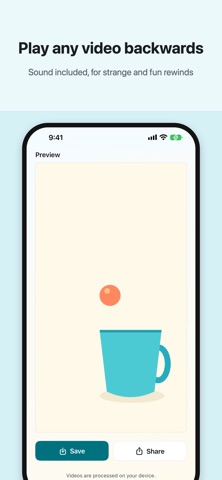
There is no timeline and no complicated editing. You pick a video, choose the part you want, tap Reverse, preview the result in the app, and then save it to Photos or send it anywhere with the share sheet. The sound plays backwards too, or you can turn it off for a silent clip. You can also choose a speed from 0.25× to 2×, or use Boomerang to join forward and reverse into one clip.
Everything is processed on your iPhone. Videos are never uploaded, and there is no account to create. Your original video stays untouched, there is no watermark, and exports keep the original resolution and frame rate (HDR is converted to SDR). The app is free, with no ads and no subscription, and is available in 25 languages.
Who It Is For
- People who want a quick reverse video or rewind effect for social posts, Shorts, or Reels
- Parents and friends capturing funny everyday moments to replay backwards
- Anyone who finds full video editors too heavy for a single simple effect
- Users who prefer on-device processing with no upload and no account
Main Features
- Pick any video from Photos, of any length, and reverse just the part you want (up to 15 seconds per clip)
- Reversed sound, or turn the sound off for a silent clip
- Free speed control: 0.25×, 0.5×, 1×, 1.5× or 2×
- Boomerang joins forward and reverse into one clip, with or without sound
- Preview in the app, then save to Photos or share through the iOS share sheet
- No watermark; keeps the original resolution and frame rate, with HDR converted to SDR
- Processed entirely on your iPhone — no upload, no account, your original video stays untouched
- Free, with no ads and no subscription; available in 25 languages
How to Use
- Open UndoCam and pick a video from your Photos library.
- Choose where to start and how long, up to 15 seconds.
- Optionally choose a speed, turn the sound off, or switch on Boomerang.
- Tap Reverse and wait a moment while your iPhone creates the clip.
- Preview the rewind clip in the app.
- Save it to Photos or share it with the share sheet.
Pricing
UndoCam is free, with no ads, no subscription, and no account. Speed control and Boomerang are free too. App Store pricing and availability can change, so check the store listing for current details.
Privacy
Videos are processed entirely on your iPhone. UndoCam does not require an account, does not upload your videos, and has no ads. Your original video stays untouched. See the App Store privacy label for the current declaration.
Screenshots


FAQ
Is UndoCam free?
Yes. UndoCam is free, with no ads, no subscription, and no account. Speed control and Boomerang are free too. Pricing on the App Store can change, so check the listing for current details.
Are my videos uploaded anywhere?
No. All video processing happens on your iPhone. UndoCam does not upload videos and does not require an account.
How long can the video be?
You can pick a video of any length, then choose the part you want. Each reversed clip can be up to 15 seconds long.
Does the reversed video keep its sound?
Yes. The sound plays backwards too, or you can turn it off for a silent clip.
What quality is the exported video?
UndoCam keeps the original resolution and frame rate. HDR videos are converted to SDR with correct colors. There is no watermark.
Can I change the speed or make a boomerang?
Yes. Choose 0.25×, 0.5×, 1×, 1.5× or 2× for free. Boomerang joins forward and reverse into one clip, with or without sound.
Does UndoCam change my original video?
No. The reversed clip is saved as a new video. Your original stays untouched in your Photos library.