
PinLog Text Notes
Save text, links, and photos as pins from the share sheet or clipboard, and let them come back through the widget and reminders.
Overview
PinLog Text Notes is a memo app that brings back the text and links you want to return to later. Type a note, dictate it with voice input, paste from the clipboard, import a file, pin a screenshot or photo, or send content from another app through the share sheet. Pins saved a few days ago, or not viewed for a while, return on the home screen and in the widget.
PinLog is intentionally small: no tags, no folders, and no complicated note system. Instead of turning into a full notes app, it focuses on one job — capturing something now so you can act on it later. Mark a pin Done and it stops coming back, but it stays saved so you can restore it. Saved URL pins open directly in your browser, and links inside notes are tappable from the detail view.
Pins are stored only on this iPhone. No account is required, and there are no ads. The app, widget, and share extension share the same local storage so a pin saved from anywhere shows up everywhere.
Who It Is For
- People who collect short notes, prompts, links, and reminders throughout the day
- Readers who save articles and URLs to come back to later
- Makers and writers capturing product ideas and launch notes before they slip away
- Anyone who wants quick capture from the iOS share sheet without a heavyweight notes app
- Users who like being reminded of saved items via a Home Screen widget
Main Features
- Save text and links quickly as pins
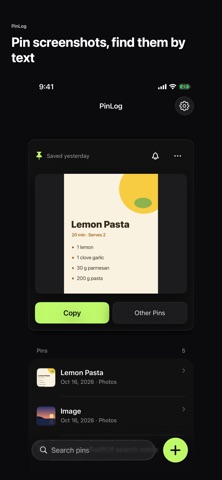
- Pin screenshots and photos, and search for words inside images (read on your device only)
- Dictate notes with voice input
- Paste directly from the clipboard
- Import text, Markdown, and JSON files
- Save from other apps with the share extension, Siri, Control Center, or the Shortcuts app
- See the page title on pins that contain links
- Home screen widget that brings saved pins back
- Reminders for Tonight, Tomorrow morning, the Weekend, or a date and time you choose, plus an optional daily pin notification
- Mark pins Done from the app, widget, or a notification, and search everything you have saved
How to Use
- Open PinLog and add a note by typing, dictating, or pasting from the clipboard
- In other apps, use the share sheet and choose PinLog to save text, a link, or an image as a pin
- Review your pins in the main list and open one for the full detail view
- Tap a URL pin to open it in your browser, or tap links inside a note
- Add the widget to your home screen so saved pins come back on their own
- Use a pin's bell to set a reminder, or turn on the daily pin notification in Settings
- Mark a pin Done once you have acted on it; it stays saved and can be restored later
Pricing
PinLog Text Notes is free to download and use, with no ads. The features described here are available without a purchase. App Store pricing and availability can change, so check the store listing for the latest details.
Privacy
PinLog does not require an account. Pins are stored only on your iPhone, and the app uses no analytics, ads, or tracking. For link pins, the app loads the saved page directly from your iPhone to show its title, which sends a request to the website you saved. Text in images is read on your device only. Microphone and speech recognition are used only when you start voice input, and clipboard text is read only when you tap the clipboard import action.
Screenshots




FAQ
Is PinLog Text Notes free?
Yes. PinLog is free to download and use, and there are no ads. Check the App Store listing for current pricing details.
Where are my notes stored? Do I need an account?
No account is needed. Pins are stored only on your iPhone, and the app uses no analytics, ads, or tracking.
Can I save links from Safari or other apps?
Yes. PinLog includes a share extension, so you can send text or links from other apps through the iOS share sheet and they are saved as pins. You can also save by Siri, Control Center, or the Shortcuts app.
Does PinLog have a widget?
Yes. Pins saved a few days ago, or not viewed for a while, return on the home screen and in the widget, so you remember to act on them without opening the app.
Can I import existing files?
Yes. PinLog can import text, Markdown, and JSON files as pins.
Can I pin screenshots and photos?
Yes. You can pin images straight from Photos or a screenshot's Share button, and search finds words inside your images. The text is read on your device only.
Can PinLog remind me about a pin?
Yes. Use a pin's bell to set a reminder for Tonight, Tomorrow morning, the Weekend, or a date and time you choose. You can also turn on a daily notification that brings back one pin at your chosen time.
Is PinLog a full notes app with folders and sync?
No, and that is by design. PinLog is a small capture tool — no tags, no folders, and no sync. It is built for saving something quickly and coming back to it later.
Does PinLog read my clipboard automatically?
No. Clipboard text is read only when you explicitly tap the clipboard import action.