
PillTap
A daily medication reminder with one-tap logging from the notification, a Lock Screen widget, and Live Activity.
Overview
PillTap helps you avoid missed doses with simple daily medication reminders. Set your medication times once, and PillTap will remind you every day at the times you choose — morning, noon, night, and bedtime. It is built for medicines and supplements you take at the same times every day.
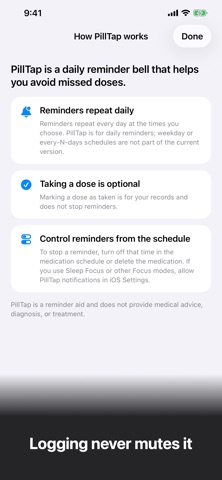
Marking a dose as taken is optional and used only for your own record. You can tap Taken right from the notification without opening the app. Reminders continue to repeat unless you turn off a scheduled time or delete the medication. An optional follow-up reminder can sound 15 minutes later.
A Lock Screen widget shows your next dose, and a Live Activity appears shortly before it is time. PillTap does not provide medical advice, assess conditions, or recommend how to take medication; always follow instructions from your doctor, pharmacist, or healthcare provider.
Who It Is For
- People who tend to forget daily medicines or supplements
- Users who want a simple reminder rather than a complex health tracking system
- People who take medication at the same times every day
- Anyone who wants a private reminder with no account and no cloud
- People who understand that the app is not medical advice
Main Features
- Daily medication reminders at morning, noon, night, and bedtime, set per medication
- Optional follow-up reminder 15 minutes later (can be turned off in settings)
- One tap to mark a dose as taken, right from the notification
- Lock Screen widget showing your next dose
- Live Activity shortly before it is time (choose 5, 15, or 30 minutes before)
- Time Sensitive reminders that can appear during Sleep or other Focus modes, based on your iOS settings
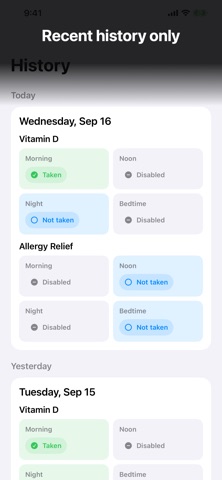
- Recent history: today, yesterday, and the last 7 days
- Daily schedule only: no weekday or every-few-days schedules, medication calendar, remaining-supply tracking, or family sharing
- No account and no cloud; your medications and records stay on your device
How to Use
- Add a medication and choose its times: morning, noon, night, and bedtime.
- Optionally turn on the follow-up reminder and the Live Activity lead time.
- When the notification arrives, take your medication as directed by your doctor or pharmacist, then tap Taken if you want to record it.
- Add the Lock Screen widget to see your next dose at a glance.
- Check the recent history for today, yesterday, and the last 7 days. To stop reminders, turn off that time or delete the medication.
Pricing
PillTap is free to download. App Store pricing and availability may vary by country and can change over time, so check the listing for current details.
Privacy
PillTap needs no account and has no cloud. According to the App Store listing, your medications and records stay on your device. Reminders are notifications on your device. PillTap is a reminder and personal record aid, not a substitute for medical records kept by a healthcare provider. See the App Store page for Apple's current privacy label.
Screenshots



FAQ
Is PillTap medical advice?
No. PillTap does not provide medical advice, diagnosis, treatment recommendations, or medication instructions. Always follow instructions from your doctor, pharmacist, or healthcare provider.
Does PillTap guarantee that I take medicine correctly?
No. PillTap is a reminder and personal record aid and cannot guarantee medication adherence or safety.
What do I do if I do not tap Taken?
Nothing. Tapping Taken is optional and only for your own record. Reminders repeat the next day anyway.
Can I use it on a schedule other than every day?
No. The schedule is a fixed daily one: morning, noon, night, and bedtime. There are no weekday or every-few-days schedules.
Can reminders appear during Sleep or Focus modes?
They can appear as Time Sensitive notifications, depending on your iOS settings.
Where is my data stored?
There is no account and no cloud. According to the App Store listing, your medications and records stay on your device.
Should I use PillTap instead of talking to a doctor or pharmacist?
No. Always follow guidance from qualified healthcare professionals for medication questions.