
Mute Video Before Share
Remove sound from any video in one tap, or beep out selected parts — from the share sheet too. No re-encoding, no watermark.
Overview
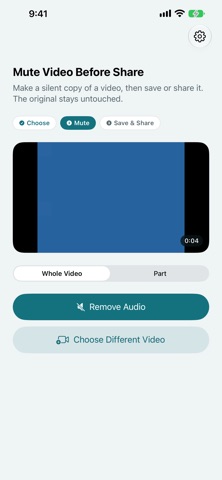
Mute Video Before Share removes the audio track from a video so you can share it without background voices, conversations, or noise. Pick a video, tap once, and get a silent copy ready to post or send — while your original video stays completely unchanged. You can also choose Mute & Share straight from the share sheet to make a silent copy without opening the app.
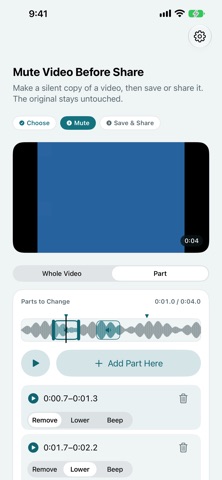
Unlike video editors that re-encode everything, this app copies the video track as-is and simply drops the audio. That means zero picture-quality loss, fast results even on long videos, no length limit, and no watermark. If you only need to hide part of the sound, you can replace selected parts with a beep, using the sound's waveform to spot where people are talking.
The silent copy is also cleaner than the original in one important way: it contains no location or camera metadata from the source video, so you are not leaking where a clip was filmed when you share it. The app is available in 25 languages and works in portrait and landscape on iPhone, and on iPad.
Who It Is For
- People posting videos to social media who want background conversations muted
- Parents sharing kids' videos without household voices or names in the audio
- Sellers adding videos to marketplace listings without ambient noise
- Anyone sending clips to work, school, or family who wants privacy in the soundtrack
Main Features
- Remove all sound from a video in one tap
- Mute & Share from the share sheet to make a silent copy without opening the app
- Replace sound with a beep in selected parts, with a waveform to help you find where people are talking
- No quality loss — the video track is copied as-is, not re-encoded
- No length limit and fast processing even for long videos
- No watermark on the silent copy
- Silent copy contains no location or camera metadata from the original
- Preview the result, then save to Photos or share directly
- Original video stays unchanged — everything runs on your device
- Available in 25 languages; works in portrait and landscape on iPhone, and on iPad
How to Use
- Open the app and choose a video from your Photos library, or choose Mute & Share from the share sheet in another app.
- Preview the selected video.
- Remove the audio and wait a moment while the silent copy is created on your device. To hide only part of the sound, choose the parts to replace with a beep instead.
- Preview the result to confirm it looks and sounds right.
- Save it to Photos or share it directly with the share sheet.
Pricing
Mute Video Before Share is free on the App Store, with no ads and no watermark. App Store pricing and availability can change, so check the store listing for current details.
Privacy
Everything runs on your device: no account, no upload, no server processing, no ads, and no tracking. Photos access is used only to select a video and save the silent copy. As a bonus, the exported silent copy carries no location or camera metadata from the original video.
Screenshots



FAQ
Is Mute Video Before Share free?
Yes. The app is free with no ads and no watermark. App Store pricing can change, so check the listing for current details.
Are my videos uploaded anywhere?
No. Audio removal happens entirely on your device. There is no account, no upload, no server processing, and no tracking.
Does removing the audio reduce video quality?
No. The video track is copied as-is without re-encoding, so the picture quality of the silent copy is identical to the original.
Is there a video length limit?
No. Because the video is not re-encoded, even long videos finish fast.
Can I mute only part of a video?
Yes. You can replace the sound in selected parts with a beep, and the waveform helps you spot where people are talking.
Can I use it from the share sheet?
Yes. Choose Mute & Share from the share sheet to make a silent copy without opening the app.
Does it change my original video?
No. The app creates a new silent copy and leaves your original video untouched in your library.
Does the silent copy include location data?
No. The silent copy contains no location or camera metadata from the original, which makes it safer to share publicly.