
Laundry Tap: Washer Timer
A wash and dry timer with a Lock Screen countdown and reminders, plus a one-tap log of when you last did the laundry.
Overview
Laundry Tap reminds you when the wash is done and keeps track of when you last did the laundry. Start a wash or dry timer, put your phone away, and get a notification when the cycle ends. The countdown also stays on your Lock Screen and in the Dynamic Island.
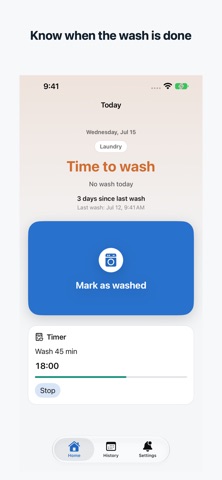
When the clothes are hung up, tap once to log today's laundry. Home then shows how many days it has been since your last wash and when it is about time again, and a monthly calendar lets you look back at your laundry days.
It is a small, focused tool rather than a full chore manager. It does not connect to your washing machine, so the timer uses the length you set, and it does not handle laundromat payments or weather forecasts.
Who It Is For
- People who walk away from the washer and want a reminder when the cycle ends
- People who forget when they last did the laundry
- Households that want a small, quick log of laundry days
- Users who prefer a dedicated laundry tool over a full chore app
- Busy users doing laundry between work, errands, or family routines
Main Features
- Wash and dry timers from 5 to 180 minutes, remembering your last length
- Live Activity countdown on the Lock Screen and in the Dynamic Island
- Notification when the cycle ends, with a button to log today's laundry
- One-tap "Hung up" log, plus "days since last wash" and a gentle status based on how often you like to wash (every 1–7 days)
- Monthly calendar of your laundry days; tap any day to add or remove it
- Up to 5 reminders, each with its own time and days (every day, weekdays, weekends, or days you pick), and an option to stay quiet on days you have already washed
- Log laundry with Shortcuts and Siri, Home Screen and Lock Screen widgets, Control Center, or a control on Apple Watch (watchOS 26) without opening the app
- Available in 25 languages
How to Use
- Tap "Wash 45 min" or "Dry 60 min" to start a timer; you choose the length.
- Put your phone away. The countdown shows on the Lock Screen and in the Dynamic Island.
- When the notification arrives, hang up the laundry and tap "Hung up" to log today's laundry.
- Check Home for the days since your last wash, or open the monthly calendar to look back or fix a day.
- Optionally set up to 5 reminders and add widgets or the Control Center control for quicker logging.
Pricing
Laundry Tap is free to download. According to its App Store listing, it has no ads and no in-app purchases. App Store pricing and availability can change, so check the listing for current details.
Privacy
Laundry Tap needs no account and has no ads. According to the App Store listing, everything stays on your iPhone and nothing is sent to a server. The app uses notifications for timers and reminders. See the App Store page for Apple's current privacy label.
Screenshots


FAQ
What is Laundry Tap for?
It reminds you when the wash is done with a timer and notification, and keeps track of when you last did the laundry so you can see at a glance whether it is about time again.
Is Laundry Tap a chore management app?
No. It is intentionally small and focused on laundry timers and a laundry log rather than managing every household task.
Does it connect to my washing machine?
No. The timer simply counts down the length you set. It also does not handle laundromat payments or weather forecasts.
Does Laundry Tap replace reminders?
It includes its own reminders: up to 5, each with its own time, on every day, weekdays, weekends, or days you pick. It can stay quiet on days you have already washed.
Can I log laundry without opening the app?
Yes. You can log from the timer notification, Shortcuts and Siri, Home Screen and Lock Screen widgets, Control Center, or a control on Apple Watch with watchOS 26.
Is my data sent anywhere?
According to the App Store listing, everything stays on your iPhone and nothing is sent to a server. There is no account.
Where can I download it?
Use the App Store link on this page to open the official Laundry Tap product page.