
Foot Size Check
Measure kids' feet with just a sheet of Letter or A4 paper and a photo. Get foot length, width, a suggested shoe size, true-size foot outlines, and a growth record.
Overview
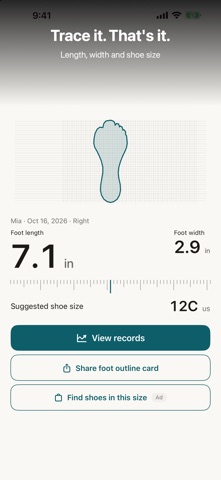
Foot Size Check measures feet with nothing but a sheet of Letter or A4 paper and a photo. Kids' feet grow fast: place a foot on the paper, trace around it with a pen, and photograph the sheet. The app reads the outline and measures foot length, width, and a suggested shoe size automatically - no points to line up by hand (you can still fine-tune them). The outline is kept at true size.
Unlike mail-order measuring mats, there is nothing to buy or wait for. Beyond the measurement you get a growth history with left and right feet tracked separately, foot outline and growth cards to share with family, EU, US, and UK size conversion and a shoe size chart, insole measuring to see your current toe room, and tips on how to fit shoes. Reminders for the next measurement and one-time birthday messages are free.
No account and no banner ads. Photos and records stay on your device, with optional iCloud sync to your own iCloud; the developer cannot read your data. "Find shoes" (Japan) links include advertising (affiliate links). Foot Size Check Pro is an optional one-time purchase, not a subscription. Results are estimates only; shoe fit varies by brand, model, and foot shape, so we recommend measuring in person before buying shoes.
Who It Is For
- Parents checking a child's shoe size before buying new shoes
- Families who want a growth record of kids' feet over time
- Shoppers who want a quick shoe size guide without ordering a measuring mat
- Families with siblings who want to keep each child's measurements and foot outlines
- People who prefer a no-account, on-device tool for body measurements
Main Features
- Foot measurement on Letter or A4 paper: trace the foot, photograph the sheet, and get length and width automatically (adjust by hand if you like)
- Foot outline saved as a true-size shape, with a foot outline card to send to family right after saving
- Suggested shoe size (foot length plus 0.5-1.0 cm), EU, US, and UK conversion, and your own notation (JP, EU, US, or UK in Settings)
- Shoe size chart for children, men, and women
- Growth history over time, left and right feet tracked separately, and a growth card to share as one image
- Insole measuring to see the current toe room, and how-to-fit-shoes checks based on podiatry society guidance
- Find shoes by age and sex or by use, My size book, seasonal shoe reminders, and age-based measurement reminders (Japan; links include advertising)
- Optional iCloud sync to your own iCloud; no account, no banner ads
- Foot Size Check Pro (optional one-time purchase): same-age reference band on the growth chart, shoe replacement estimate, more than one child and shoe note, full "All" growth span, show-in-store large text, and more
How to Use
- Choose Letter or A4 paper, place a sheet on a flat floor, and stand the foot on it.
- Trace around the foot with a pen, then photograph the sheet.
- The app reads the outline and places the heel, toe, and width points for you. Fine-tune them by hand if needed.
- Read the measured foot length, width, and suggested shoe size, and save the record to build a growth history (left and right feet separately).
- Share the foot outline card or growth card with family, or turn on measurement reminders for the next time.
Pricing
Foot Size Check is free to download on the App Store, with no banner ads and no subscription. Foot Size Check Pro is an optional one-time purchase that adds extras such as a same-age reference band on the growth chart, a shoe replacement estimate, and more than one child. Measuring, records, the growth chart, foot outlines, reminders, and birthday messages are free. App Store pricing can change, so check the store listing for current details.
Privacy
No account and no banner ads. Photos and records stay on your device. iCloud sync is optional: records and outlines are saved to your own iCloud, and annotated measurement photos stay on the device. The developer cannot read your data. Links in "Find shoes" include advertising (affiliate links). For the authoritative summary, see the privacy label on the app's App Store page.
Screenshots


FAQ
Is Foot Size Check free?
Yes. The app is free to download, with no banner ads and no subscription. Foot Size Check Pro is an optional one-time purchase for extras, while measuring, records, the growth chart, foot outlines, reminders, and birthday messages are free. App Store pricing can change, so check the listing for current details.
Are my photos uploaded anywhere?
No. Photos and records stay on your device, and the developer cannot read your data. If you turn on iCloud sync, records and outlines are saved to your own iCloud (annotated measurement photos stay on the device).
What do I need to measure a foot?
A sheet of Letter or A4 paper, a pen, and your iPhone. Place the foot on the paper, trace around it, and photograph the sheet. There is no measuring mat to order and no sign-up.
How accurate are the results?
Results are estimates. The app places the measurement points automatically and you can fine-tune them by hand, but shoe fit varies by brand, model, and foot shape, so an in-person fitting is recommended before buying shoes.
Can I track my child's foot growth over time?
Yes. Saved measurements build a growth history, left and right feet are tracked separately, and foot outlines are kept at true size so you can compare records. You can also share a growth card with family.
How is the suggested shoe size worked out?
It is a label-size guide: foot length plus 0.5-1.0 cm. You can see EU, US, and UK conversion and choose your own notation (JP, EU, US, or UK) in Settings. It is separate from the inside length you can measure with an insole.
Do I need an account?
No. There is no account or sign-up. iCloud sync is optional and uses your own iCloud.
Are there ads?
There are no banner ads. Links in "Find shoes" (Japan) include advertising (affiliate links).