
Food Photo Diary: GohanSnap
A meal photo diary that turns your food photos into a calendar of everyday memories. Just take a photo; add a dish name or calorie note only when you want to.
Overview
GohanSnap (Japanese name: ごはんスナップ) is a food photo diary that turns your meal photos into a calendar of everyday memories. Just take a photo with the camera or pick one from your library - the entry takes its time from the photo, and breakfast, lunch, dinner, or snack is chosen from that time (you can change it later). Dish names and calorie notes are optional: add them only when you want to.
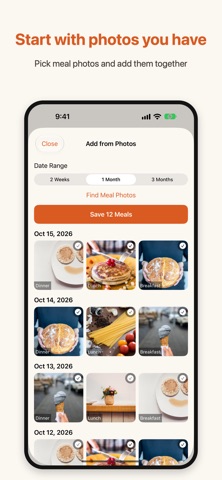
It is a record, not a diet coach. The daily calorie total adds up only the values you entered, you set your own daily calorie goal (the app does not recommend one), and it does not judge meals as good or bad. Add from Photos finds meal photos on your device so you can record several at once, and you can still record a dish name or note without a photo. Entries can be tagged Home cooking, Eating out, or Takeout, saved as My Items to record the same meal again, searched, and exported as CSV.
Look back with a monthly calendar and daily list, this month's summary and your recording streak, a Home Screen widget, and optional breakfast, lunch, and dinner reminders (off by default). You can share your month in meals as one image, and export entries and photos together as a backup file. Your entries are stored on your device, with no ads and no account. This app does not provide medical or nutritional advice.
Who It Is For
- People who gave up on strict calorie-counting apps but still want to remember what they ate
- Anyone who wants a visual meal diary with the lowest possible effort
- People reviewing their eating patterns by looking back over a calendar of photos
- Users who want to prepare a question about their meals for an AI app they already use
- Privacy-conscious users who want food records kept on their phone
Main Features
- Record a meal from the camera or photo library; the time comes from the photo and the meal type (breakfast, lunch, dinner, snack) is picked automatically
- Add from Photos: find meal photos on your device and record several at once; or record a dish name or note without a photo
- Optional dish name, calories, notes, date and time, edited later; the daily total adds up only what you entered, with your own daily calorie goal
- My Items keep photos, calories, and notes so you can record the same meal again with a tap; tags for Home cooking, Eating out, and Takeout; search and CSV export
- On iPhones with Apple Intelligence, a short on-device caption for each photo - it never estimates calories and can be turned off
- Optional Apple Health integration: writes only the calories you enter, never reads Health data, off by default
- Choose what to ask an AI, then hand the question and photos to the external AI app you use - the app never sends anything to an AI service on its own
- Monthly calendar, daily list, monthly summary, recording streak, shareable month image, Home Screen widget, and optional reminders (off by default)
- Backup of entries and photos in one file via Files or AirDrop; entries are stored on your device, with no ads and no account
How to Use
- Open the app when you eat and take a photo, or pick one from your library (or use Add from Photos to record several at once).
- The meal type is chosen from the photo's time - change it if you like.
- Add a dish name, calories, or a note only when you want to; tap a photo later to edit details.
- Look back over the monthly calendar and daily list, and check this month's summary and your recording streak.
- Optionally turn on reminders, Apple Health, or photo saving in Settings (all off by default), or export a backup file.
Pricing
GohanSnap is free on the App Store, with no ads and no account required. App Store pricing and availability can change, so check the store listing for current details.
Privacy
Your entries are stored on your device. Writing calories to Apple Health happens only when you turn it on, and the app never reads Health data. There is no account and no ads. The app never sends anything to an AI service on its own - if you choose to ask an AI, you hand the question and photos to an external AI app yourself. Photo captions are made on your iPhone with Apple Intelligence. See the App Store privacy label for the current details.
Screenshots


FAQ
Is GohanSnap free?
Yes. The app is free with no ads and no account required. App Store pricing can change, so check the listing for current details.
Does it count calories or analyze nutrition?
Not for you. Calories are optional notes you enter yourself, and the daily total adds up only those values. The app never estimates calories, does not recommend a goal, and does not judge meals as good or bad - it is a record, not a diet coach.
Where is my meal data stored?
On your device. Entries are stored locally, and writing to Apple Health happens only when you turn it on. There is no account. You can also export entries and photos as a backup file.
Is there AI in the app?
No AI service is used by the app on its own. On iPhones with Apple Intelligence it can add a short caption to each photo, made on your device. You can also prepare a question and hand it, with your photos, to an external AI app you use, such as ChatGPT or Claude.
How do I record a meal?
Take a photo with the camera or pick one from your library. The time comes from the photo and the meal type is chosen from it. Add a dish name, calories, or a note later if you like - or record without a photo.
Does it help me keep the habit going?
Gently. It shows your recording streak and a short monthly summary, and offers optional breakfast, lunch, and dinner reminders (off by default) and a Home Screen widget.
Is this app available in English?
Yes. GohanSnap is available in English, Japanese, and many other languages - more than 20 in total. Check the App Store listing for the current list.
Does it work with Apple Health?
Optionally. When you turn it on, the app writes only the calories you enter to Apple Health as dietary energy. It does not read any Health data, and it is off by default.