
DoneToday: Daily Log
Mark your one daily habit done with a single tap - from the Home Screen, Lock Screen, Control Center, or Apple Watch - and watch your streak and calendar fill up.
Overview
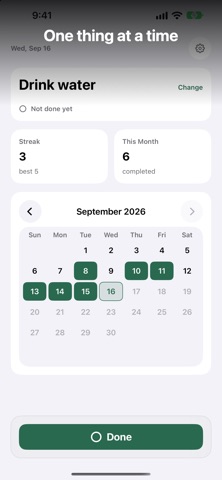
DoneToday: Daily Log is a one-tap habit tracker for a single daily task. No task lists, no planning overload: name your one thing, tap Done once a day, and see your current streak, best streak, and a monthly calendar fill up. You don't even need to open the app.
It is deliberately not a task manager. There are no multiple tasks, no social features, and no detailed statistics - the whole app is built around the one action that matters: did you do your thing today? That focus keeps it fast enough to actually use every day.
You can mark today done from Home Screen widgets (with a Done button and your last 7 days), Lock Screen widgets, a Control Center toggle (iOS 18), Apple Watch, or Siri and Shortcuts. An optional daily reminder stays quiet once today is done. Forgot yesterday? Mark it later from the calendar. There is no account and no cloud: your history stays on your device unless you export a backup yourself.
Who It Is For
- People trying to build one daily habit, like exercise, journaling, or language practice
- Anyone who abandons full-featured habit apps because they take too long to log
- Users who want to log from the Home Screen, Lock Screen, Control Center, or Apple Watch without opening the app
- People who want a reminder that knows to stay quiet once the task is done
Main Features
- One task at a time, one tap to mark it done
- Current streak, best streak, and a monthly calendar
- Home Screen widgets with a Done button and your last 7 days
- Lock Screen widgets, a Control Center toggle (iOS 18), and Apple Watch
- Siri and Shortcuts: mark done, or check today's status and your streak in automations
- Optional daily reminder (with a Done action) that stays quiet once today is done
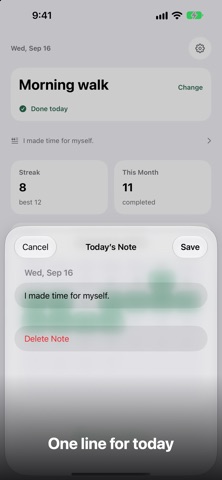
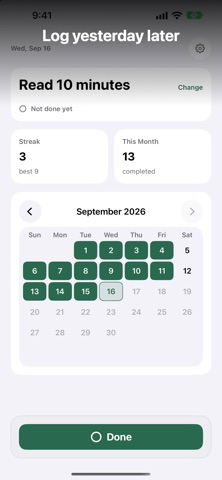
- Forgot yesterday? Mark it later from the calendar or the one-line prompt, and add an optional one-line note
- Starting a new task keeps the old one in Past Tasks
- Export a backup file and restore it on a new iPhone; share this month's calendar as an image
- No account, no cloud - your history stays on your device
How to Use
- Open DoneToday and name the one daily task you want to track.
- Tap once to mark today as done - in the app, or from a widget, Control Center, Apple Watch, or Siri.
- Open the calendar to review which days you completed, and fill in a day you forgot.
- Add a Home Screen or Lock Screen widget to see and mark today's status without opening the app.
- Optionally turn on a daily reminder - it stays quiet once you have finished for the day.
Pricing
DoneToday: Daily Log is free on the App Store with no in-app purchases. App Store pricing can change, so check the store listing for current details.
Privacy
No account and no cloud: your completion history stays on your device unless you export a backup file yourself. Widget data is shared with the app through local on-device storage. For the authoritative summary, see the privacy label on the app's App Store page.
Screenshots


FAQ
Is DoneToday free?
Yes. The app is free to download and has no in-app purchases. App Store pricing can change, so check the listing for current details.
Where is my data stored?
On your device. DoneToday has no account and no cloud - your history stays local unless you export a backup file yourself. See the App Store privacy label for the full summary.
Does DoneToday have a widget?
Yes. Home Screen widgets have a Done button and show your last 7 days, and there are also Lock Screen widgets and a Control Center toggle (iOS 18). You can mark today done without opening the app.
Can it remind me every day?
Yes. You can enable an optional daily reminder, which includes a Done action. On days you have already completed the task, the reminder stays quiet.
Can I track multiple habits?
The app focuses on a single daily task by design, which keeps logging down to one tap. When you start a new task, the old one is kept in Past Tasks. It is intentionally not a multi-list task manager.
Does it work offline? Can I use Apple Watch or Siri?
Yes. Everything is stored on the device, so no internet connection is needed to log or review your history. You can also mark today done from Apple Watch, or with Siri and Shortcuts.