
ClipMD
Turn web pages and copied text into clean Markdown clips - saved on your device, ready to paste anywhere.
Overview
ClipMD turns web pages and copied text into clean Markdown clips you keep on your device. Paste a URL or share a page to ClipMD, and it extracts the article body and converts it to Markdown - headings, lists, and links preserved - ready to paste into your notes app or keep as a reading archive.
It is a focused clipping tool, not a read-it-later service or a browser replacement. You can save .md files to a folder you choose (such as an Obsidian vault), copy an AI-ready version with summary and body sections, search your clips, and convert URLs or clipboard text from Apple Shortcuts. There is no account, no cloud sync, and no telemetry; the only network requests it makes are fetching the exact pages you ask it to convert.
Made for note-takers who live in Markdown: clip it now, paste it anywhere later.
Who It Is For
- Writers and researchers collecting article snippets for reference
- Developers who keep notes and documentation in Markdown
- Obsidian, Bear, and other Markdown notes app users who want clean paste-ready text
- Anyone tired of copy-pasting web articles and losing headings, lists, and links
- Privacy-conscious users who want clips stored locally, not on someone's server
Main Features
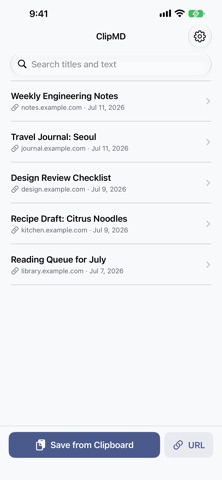
- Convert any web page to Markdown by pasting its URL
- Clip directly from Safari or other apps via the share sheet
- Convert copied text to Markdown in one tap
- Clean extraction focused on the article body, with headings, lists, and links preserved
- Clip list with detail view - copy, share, edit, or delete any clip, and search titles and text
- Save .md files to a chosen folder or Obsidian vault
- Copy an AI-ready version with clear summary and body sections
- Convert URLs or clipboard text from Apple Shortcuts
- All clips stored locally on your device; network used only to fetch pages you request
How to Use
- Find a page worth keeping - in Safari, tap Share and choose ClipMD, or copy the URL.
- In the app, paste the URL (or your copied text) and let ClipMD extract the article body.
- Review the generated Markdown - headings, lists, and links come through intact.
- Save it as a clip, then copy or share it into your notes app whenever you need it.
- Edit or delete clips from the list; your archive stays on your device.
Pricing
ClipMD is free on the App Store, with no ads. App Store pricing and availability can change, so check the store listing for current details.
Privacy
Clips, titles, and settings are stored locally on your device and are never uploaded to the developer or any third party. There is no account, no analytics, no tracking, no ads, no crash reporting, and no third-party SDKs. Network access is user-initiated only: when you give ClipMD a URL, it fetches that page directly from the site you specified and makes no other requests. Uninstalling the app removes all stored data.
Screenshots



FAQ
Is ClipMD free?
Yes. ClipMD is free on the App Store with no ads. Pricing can change, so check the listing for current details.
Where are my clips stored?
Only on your device (including App Group storage shared with the share extension). Nothing is uploaded to the developer or any third party, and uninstalling the app removes all stored data. If you choose to save .md files to a folder, those files are saved where you pick.
Does ClipMD connect to the internet?
Only when you ask it to convert a URL - it fetches that page directly from the site you specified. It makes no other network requests and has no telemetry.
Can I clip from Safari?
Yes. Use the share sheet from Safari (or other apps) and choose ClipMD to convert the page to Markdown.
What does the Markdown output keep from the page?
ClipMD extracts the article body and preserves structure - headings, lists, and links - so the clip pastes cleanly into any Markdown notes app.
Does it sync between devices?
No. There is no cloud sync or account; clips live on the device where you saved them. You can copy or share a clip, or save it as a .md file, to move it elsewhere.
Can I edit a clip after saving it?
Yes. Any clip can be copied, shared, edited, or deleted from the clip list, and you can search your clips by title and text.
Does it work with Obsidian, AI tools, or Shortcuts?
Yes. You can save .md files to a chosen folder or Obsidian vault, copy an AI-ready version with clear summary and body sections, and convert URLs or clipboard text from Apple Shortcuts.