
CleanURL Tap: Remove Tracking
Remove tracking parameters from links before you send, save, or post them. Cleans every link in a block of text and works from the share sheet and Shortcuts.
Overview
CleanURL Tap is a focused link-cleaning utility for moments when a copied URL contains tracking parameters, campaign tags, or other clutter you do not want to keep. iOS blocks some known tracking, but copied links can still carry UTM campaign tags, affiliate tags, ad click IDs, and long shop parameters.
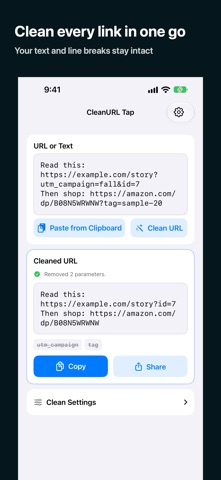
Paste a URL or a whole block of text and CleanURL Tap cleans every link while leaving the rest of the text unchanged. Removed parameter names are shown as crossed-out tags, and product choices such as variant, size, color, and quantity are kept. You can also clean links from the share sheet and Shortcuts without opening the app.
Cleanup happens on your device, and everything is free and ad-free. The app does not promise perfect removal of every possible parameter, so review sensitive links before sending them.
Who It Is For
- People who copy and share links often
- Users who prefer cleaner URLs with less tracking clutter
- Writers, researchers, and shoppers who save links for later
- Privacy-conscious users who want a small dedicated utility
Main Features
- Removes tracking parameters such as UTM tags, affiliate tags, and ad click IDs from links
- Cleans every URL inside a block of text at once, leaving the rest of the text unchanged
- Shows removed parameter names as crossed-out tags
- Works from the share sheet and Shortcuts without opening the app
- Handles Amazon, Rakuten, eBay, Etsy, AliExpress, social, and general links, and keeps choices like variant, size, color, and quantity
- Lets you choose which cleanup categories are enabled
- Cleanup runs on your device, with no account, ads, analytics, or link history
How to Use
- Install CleanURL Tap from the App Store.
- Copy a link (or a block of text containing links) from Safari or another app.
- Paste it into CleanURL Tap, or use the share sheet or Shortcuts to clean it without opening the app.
- Review the cleaned link and the removed parameter tags before sharing or saving it.
- Choose which cleanup categories are enabled in the app's settings.
Pricing
CleanURL Tap is free on the App Store, with no ads. App Store pricing can change, so check the store listing for current details.
Privacy
Cleanup happens on your device. According to the App Store listing, there is no account, advertising, analytics, link history, or network request for cleanup. For the authoritative summary of data practices, see the privacy label on the app's App Store page.
Screenshots




FAQ
What does CleanURL Tap do?
It removes tracking parameters such as UTM tags, affiliate tags, and ad click IDs from links, so you can send, save, or post cleaner URLs. It can clean every link inside a block of text at once.
Does it remove every possible tracking parameter?
No app can guarantee removal of every possible tracking mechanism. CleanURL Tap focuses on common URL clutter, and you can see exactly which parameters were removed. Review sensitive links before sending them.
Who is it for?
It is for people who copy and share links often and want a quick way to clean them before sending, saving, or posting.
Does CleanURL Tap replace a browser?
No. It is a small URL utility, not a browser replacement. You can use it from the share sheet and Shortcuts without opening the app.
Are my links sent anywhere?
No. Cleanup happens on your device, with no account, analytics, link history, or network request for cleanup. The App Store privacy label remains the source for current data disclosure details.
Where can I download it?
Use the App Store link on this page to open the official CleanURL Tap product page. It is free to download.