
BaroNote
Check current air pressure and its trend on your iPhone, then log how you feel — all stored on device.
Overview
BaroNote is a simple barometer and personal log for iPhone. It reads the current air pressure from your iPhone's built-in pressure sensor, shows whether pressure is rising, steady, or falling, and lets you save a quick private note about your mood and physical condition alongside the reading.
Many weather apps bury pressure data under forecasts and ads. BaroNote does the opposite: one clear pressure reading, a simple trend, and a lightweight log, with no forecast, no account, no tracking, no ads, and no server upload. Your records stay on your device, and the app deliberately avoids medical claims: it is for personal logging only and does not provide medical advice, diagnosis, treatment, or forecasts.
In History, BaroNote places the available six-hour pressure movement beside each log without judging the cause. Health linking is optional and off by default: when you turn it on, BaroNote writes your headache, fatigue, and (on iOS 18 or later) mood records to Apple Health. It does not read Health data.
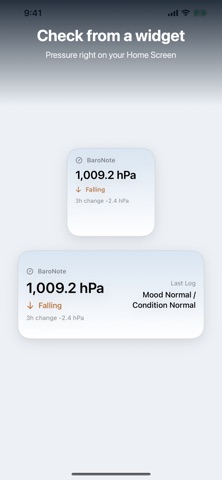
Home Screen and Lock Screen widgets show the current pressure and trend at a glance, so you can check pressure without opening the app.
Who It Is For
- People who like to note how they feel when the weather and air pressure change
- Anyone who wants a plain barometer reading without a full weather app
- Users who keep simple daily mood and condition records
- Privacy-conscious users who want their personal logs kept off the cloud
- Widget users who want pressure and trend visible on the Home or Lock Screen
Main Features
- Current air pressure from the iPhone pressure sensor (when available)
- Rising, steady, and falling trend display
- Quick logs: mood, condition, symptom tags (headache, sleepy, tired, low focus, stiff shoulders), and an optional note
- History showing each log with the available six-hour pressure movement beside it
- Optional Apple Health link (off by default) that writes headache, fatigue, and mood on iOS 18 or later; it does not read Health data
- Unit switching between hPa, mb, inHg, and mmHg
- Home Screen and Lock Screen widgets
- Records stay on this device, with a delete-all-data option in Settings
How to Use
- Open BaroNote to see the current air pressure and its trend on the Home screen.
- Tap the add-log button to record today's entry.
- Pick your mood and condition (good / normal / bad), add symptom tags, and optionally type a note.
- Review past entries in the History list.
- Change the pressure unit (hPa, mb, inHg, mmHg) in Settings if needed.
- Add a Home Screen or Lock Screen widget to check pressure and trend at a glance.
Pricing
BaroNote is free on the App Store, with no ads. App Store pricing and availability can change, so check the store listing for current details.
Privacy
Your BaroNote records stay on this device: pressure readings, mood and condition logs, symptom tags, notes, and settings are stored locally and never uploaded to a server. There is no account, no cloud sync, no tracking, no ads, and no analytics SDKs. Widgets read a local snapshot shared only between the app and its widget extension. Apple Health linking is optional and off by default; it only writes the supported items (headache, fatigue, and mood on iOS 18 or later) and never reads Health data. You can delete all local data from Settings at any time.
Screenshots



FAQ
Is BaroNote free?
Yes. BaroNote is free with no ads. App Store pricing can change, so check the listing for current details.
Where is my data stored?
Your records stay on this device. BaroNote has no account, no cloud sync, no server upload, and no tracking. You can delete all local data from Settings.
Does BaroNote work on every iPhone?
The pressure reading uses the iPhone's built-in barometric sensor. On devices without a pressure sensor, the app shows an unavailable state. BaroNote requires iOS 17 or later.
Does it have widgets?
Yes. Home Screen and Lock Screen widgets show the current pressure and trend.
Does BaroNote forecast the weather or predict headaches?
No. BaroNote shows measured pressure and a simple rising/steady/falling trend. It provides no forecasts, no diagnosis, and no medical advice. It is for personal logging only.
What can I record in a log?
Each entry can include mood and condition (good/normal/bad), symptom tags such as headache, sleepy, tired, low focus, and stiff shoulders, plus an optional note. The current pressure is saved with the entry.
Does BaroNote connect to Apple Health?
Optionally. Health linking is off by default. When you turn it on, BaroNote writes headache and fatigue records, plus mood on iOS 18 or later. It does not read Health data, and sleepiness, low focus, stiff shoulders, pressure, and notes are not written to Health.