
Compound Interest - AssetCurve
A private compound interest calculator: estimate savings growth, how long withdrawals could last, or what a goal would take.
Overview
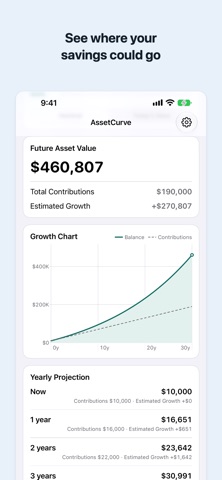
AssetCurve is a simple, private calculator for rough compound-growth estimates. Enter a starting amount, a monthly contribution, an expected annual return, and a number of years, and it shows an estimated future balance along with total contributions, estimated growth, a balance chart, and a year-by-year table.
It works in three ways. Future Value estimates what savings might grow to. Withdrawal takes your assets and a monthly withdrawal and shows roughly how long the money could last. Goal Backsolve works back from a target to the monthly contribution, the number of years, or the annual return it would take.
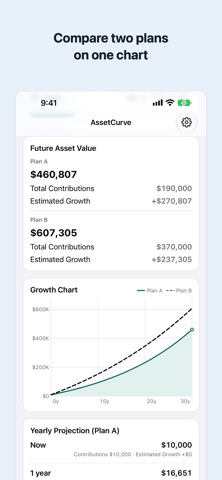
In Future Value and Withdrawal modes you can compare two saved plans side by side, and switch the chart and amounts to today's value using your own inflation input. For yen contributions, small notices flag conditions that exceed the published new NISA annual allowance or reach the lifetime tax-free holding limit (taxes are not calculated).
AssetCurve is deliberately a calculator, not a finance platform: no account, no ads, no tracking, and no network connection. It is not investment advice. Results are rough simulations with monthly compounding that do not guarantee future outcomes, and taxes, fees, currency changes, and market volatility are not included.
Who It Is For
- Savers who want a quick feel for how monthly contributions could compound over the years
- People planning toward a target amount who want to know the required monthly saving, years, or return
- People picturing how long savings might last when withdrawing monthly
- Anyone comparing rough what-if scenarios with different return rates and time horizons
- Privacy-conscious users who do not want to type financial figures into an online tool
Main Features
- Future Value mode: estimate a future asset amount from starting amount, monthly contribution, expected annual return, and years
- Withdrawal mode: see roughly how long your assets could last with a monthly withdrawal
- Goal Backsolve mode: work back from a target to the monthly contribution, number of years, or annual return required
- Balance chart and a year-by-year table of contributions and estimated growth
- Compare two saved plans side by side in Future Value and Withdrawal modes
- Switch chart and amounts to today's value using your own inflation input
- Monthly compounding, with a USD, JPY, or EUR unit selector
- Fully local: no account, no ads, no tracking, no network connection
How to Use
- Choose Future Value, Withdrawal, or Goal Backsolve mode.
- Enter your amounts, expected annual return, and years (or your target, in Goal Backsolve).
- Read the estimated result, then explore the balance chart and the year-by-year table.
- Optionally compare two saved plans, or switch to today's value with your own inflation input.
- Adjust the inputs to compare rough scenarios. All results are simplified simulations, not predictions.
Pricing
AssetCurve is free to download and use on the App Store, with no ads. App Store pricing and availability can change, so check the store listing for the latest details.
Privacy
AssetCurve has no account, no ads, no tracking, and no network connection. Everything is calculated on your device and your inputs are never sent anywhere; your last settings are saved locally on the device.
Screenshots


FAQ
Is AssetCurve free?
Yes. It is free to download and use, with no ads and no account. Check the App Store listing for current pricing details.
Does the app see my financial data?
No. AssetCurve has no network connection and no account. Everything is calculated on your device, and your inputs are not sent anywhere.
Is this investment advice?
No. AssetCurve does not recommend any investment. Results are rough simulations with monthly compounding that do not guarantee future outcomes. Taxes, fees, currency changes, and market volatility are not included.
How are the calculations done?
The simulator uses monthly compounding. Every result comes with a balance chart and a year-by-year table showing contributions and estimated growth.
Which currencies does it support?
USD, JPY, and EUR can be selected as the display unit. Switching only changes the unit; the app does not convert amounts with exchange rates.
Does it work offline?
Yes, completely. The app has no network connection and does not call any external service.